OCTI VAULT
Mobile App - EGYPT 🇪🇬

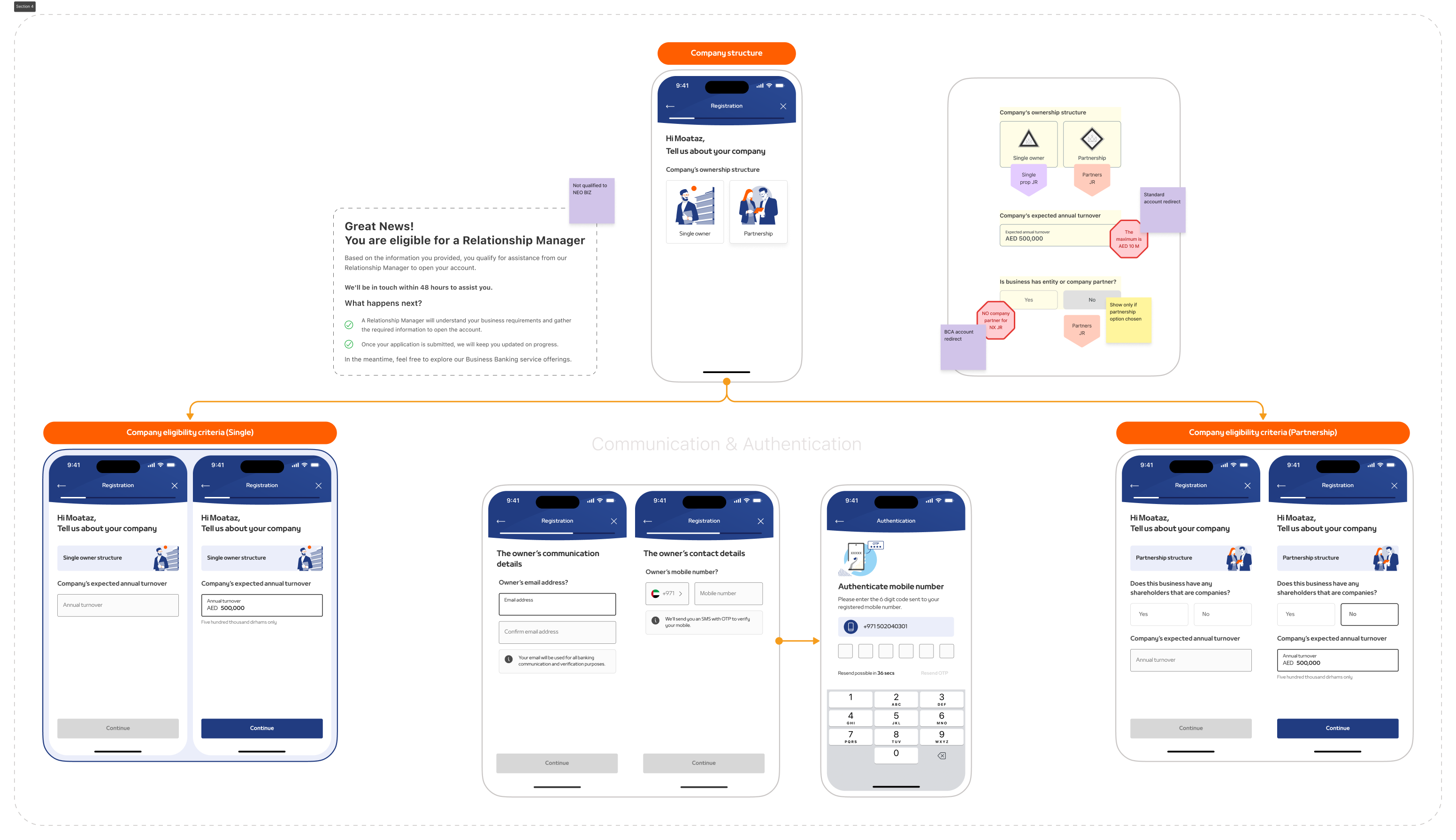
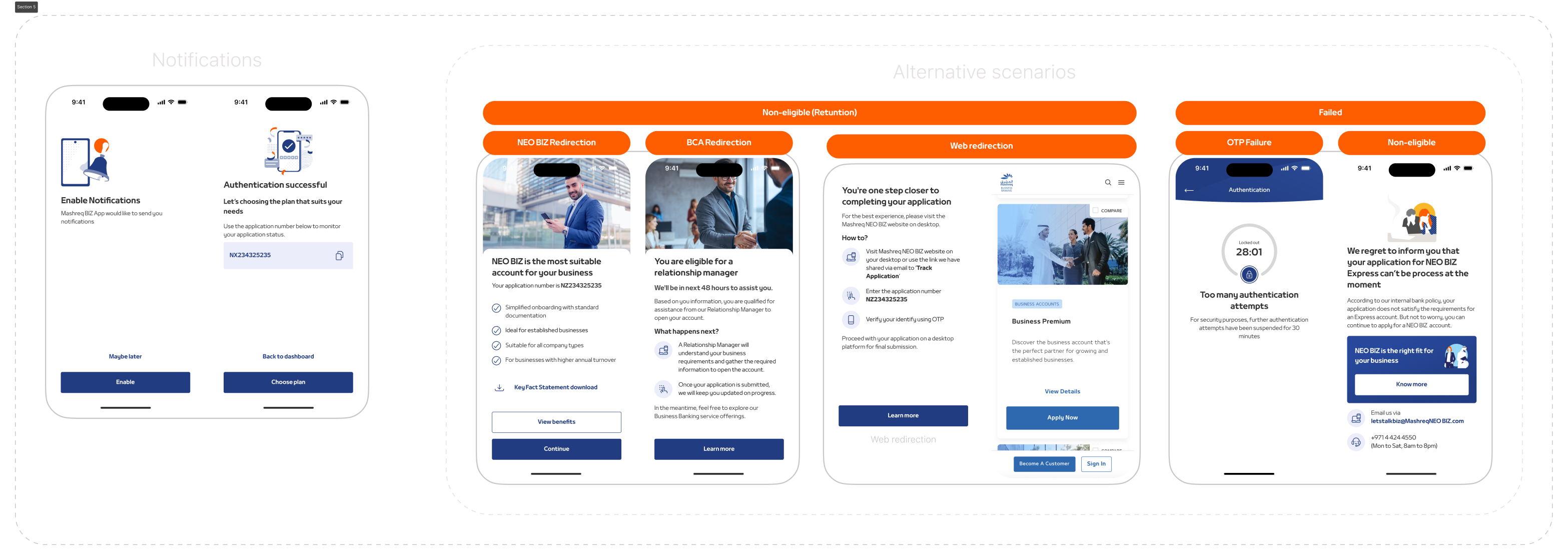
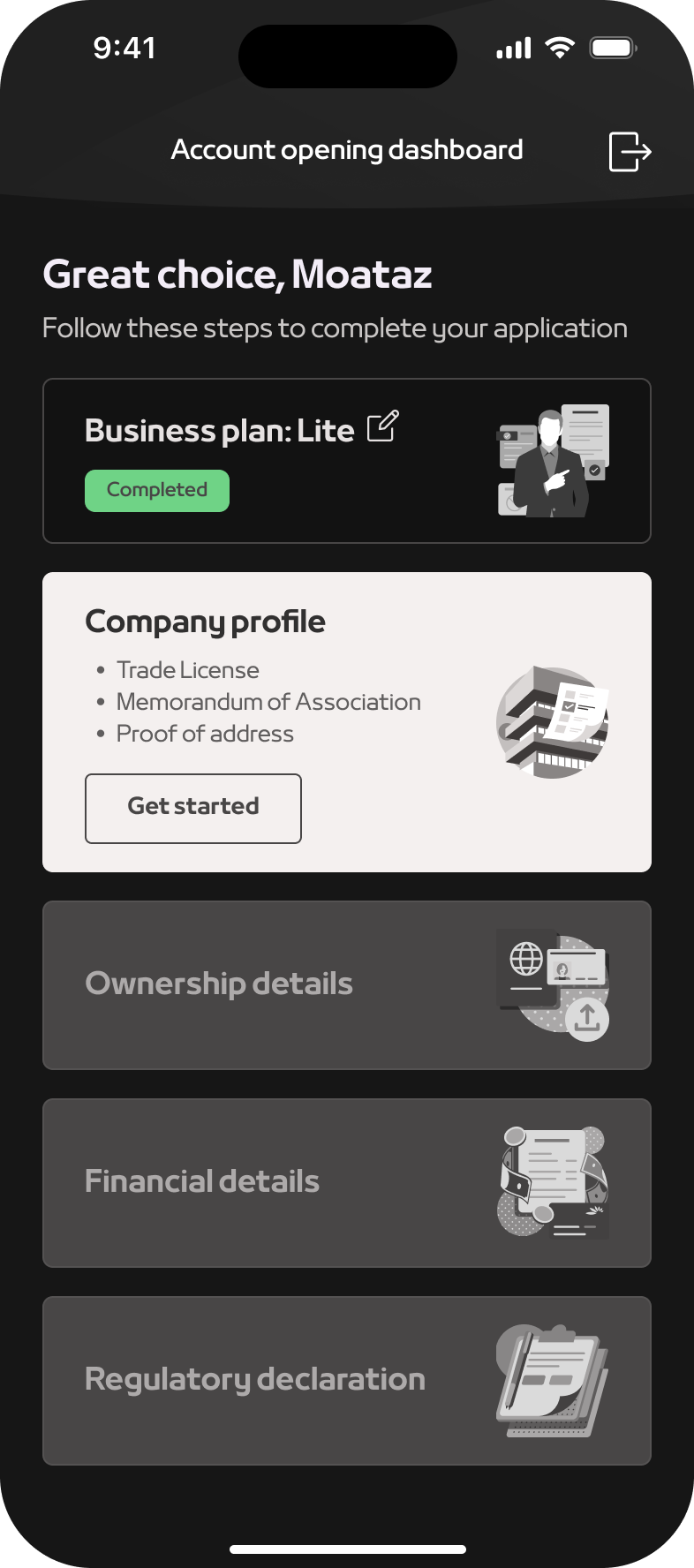
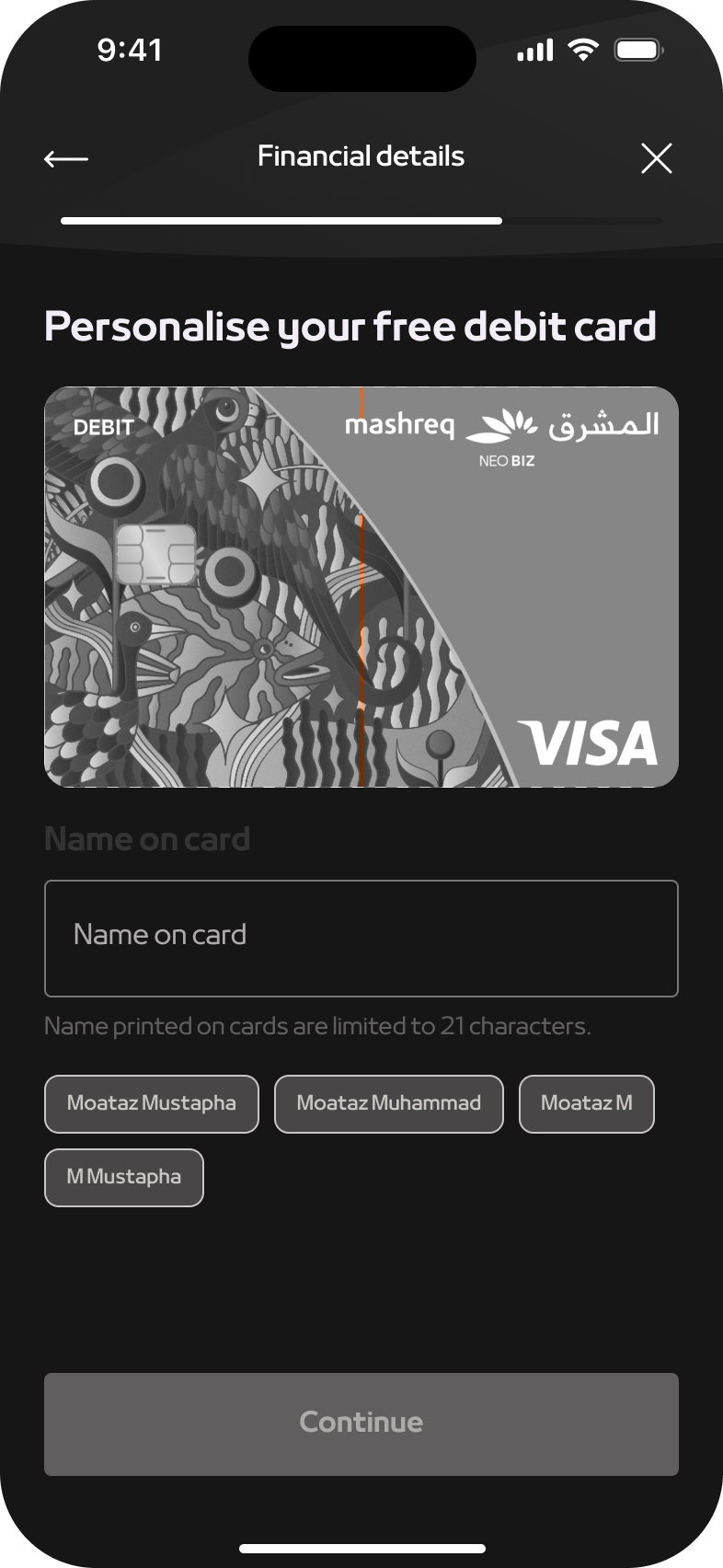
Developed a seamless and intuitive mobile app onboarding process tailored specifically for business banking customers in the UAE. This project aimed to enhance user experience, streamline the onboarding process, and increase customer acquisition and retention rates.

Date

2023 - 2024

Role

Product Design, Strategy

Platform

Web Application

Link

2023 - 2024

Transforming a Charging App into a Lifestyle Hub:
Increasing Engagement and Organic Growth

Journey begins

While I was in Egypt, an unexpected opportunity came my way through a close friend ⎯ They were looking for a product designer to help customise an existing experience to fit the local culture and preferences.

The project? A service involving “power packs” designed to charge mobile devices in emergencies. However, there was a catch—my friend had jumped straight into the hardware without any market research or a clear understanding of user needs. It felt almost comical, like starting a joke: someone spends money on a product and only then wonders about its usability.

Challenge emerges

The product’s premise was simple: users could pick up a power pack from one station, charge their mobile devices, and return the pack to any other station when done. But as we dug deeper, one critical question surfaced:

Are mobile phones the only devices running out of battery in today’s world?

In 2021, the landscape of personal devices had changed significantly.

People were no longer limited to just mobile phones. From smartwatches to earphones, tablets, and even smoking devices, the need for charging had diversified.

Our challenge was clear: this service needed to address the modern user’s lifestyle, catering to the many devices that now accompany them throughout their day.

Case study

Discovery

Understanding the Core Problem

Challenges

With this in mind, our next hurdle was not just about solving a technical problem but also a human one. How could we convince users to try this solution and trust it enough to rely on it in critical moments? That’s when I recalled a book I had read two years prior, Hooked by Nir Eyal. The principles in that book left a lasting impression on me, and this seemed like the perfect opportunity to apply what I had learned. It was time to uncover the hidden opportunities in this challenge and craft a solution that would genuinely engage users.

Discovering Opportunities

Before jumping into design, we needed to deeply understand our users. Who exactly would benefit from this product? A brainstorming session with the product manager helped us sketch out the initial persona—a user who carries multiple rechargeable devices and finds themselves in places without accessible charging options.

But it was more nuanced than that. While it’s easy to charge devices in your car or ask someone in a café for a charger, there are environments where this isn’t feasible: hospitals, banks, malls—places where people spend significant time but have limited charging options.

Thus, our persona evolved. We were targeting heavy device users—people who depend on multiple gadgets for socializing, gaming, or staying in touch with family—yet frequently find themselves in situations where their devices are out of charge, with no immediate solution available.

User personas

The Persona Takes Shape

The user persona became crystal clear: Someone who is a heavy user of more than one rechargeable device, often socializing or spending time outdoors, and is eager to keep their devices charged without disruption.

Expected Scenarios

Scenario 1:
My Battery is Not Fully Charged, and It’s Not About to Die (Yellow Mode)

Home screen (Yellow mode): The user is notified their battery is low but not critical.
Options:

  1. Get battery fully charged
  2. Discover
  3. Charge
  4. Redeem
  5. Return
Scenario 2: My battery is about to die (Red mode)

Home screen (Red mode): Urgent action is needed due to critically low battery.
Options:

  1. Charge now
  2. Discover
  3. Charge
  4. Redeem
  5. Return
Scenario 3: My battery is currently charging (Green mode)

Home screen (Green mode)**: Battery charging is in progress.
Options:

  1. Redeem
  2. Return
Scenario 1: My battery is not fully charged, and it’s not about to die (Yellow mode)

Home screen (Yellow mode): The user is notified their battery is low but not critical.
Options:

  1. - Get battery fully charged
  2. Discover
  3. Charge
  4. Redeem
  5. Return
Scenario 1: My battery is not fully charged, and it’s not about to die (Yellow mode)

Home screen (Yellow mode): The user is notified their battery is low but not critical.
Options:

  1. - Get battery fully charged
  2. Discover
  3. Charge
  4. Redeem
  5. Return
Key Findings

The research revealed several critical pain points: users found the existing onboarding forms too lengthy and confusing, security concerns were prominent, and there was a significant need for real-time assistance during the process. Users also preferred a mobile-first approach for convenience.

Competitive analysis

Benchmarking

By analysing the onboarding processes of leading competitors, we identified best practices and areas where our process lagged. Competitors with streamlined, user-friendly onboarding flows had higher user satisfaction and lower abandonment rates, highlighting the need for an improved user experience.
Solution

Ideation and Conceptualisation

Brainstorming Sessions

Initial ideas and concepts were generated through collaborative brainstorming sessions with the team. These sessions focused on innovative solutions to address the identified user pain points and improve the overall onboarding experience.

Initial Sketches and Wireframes

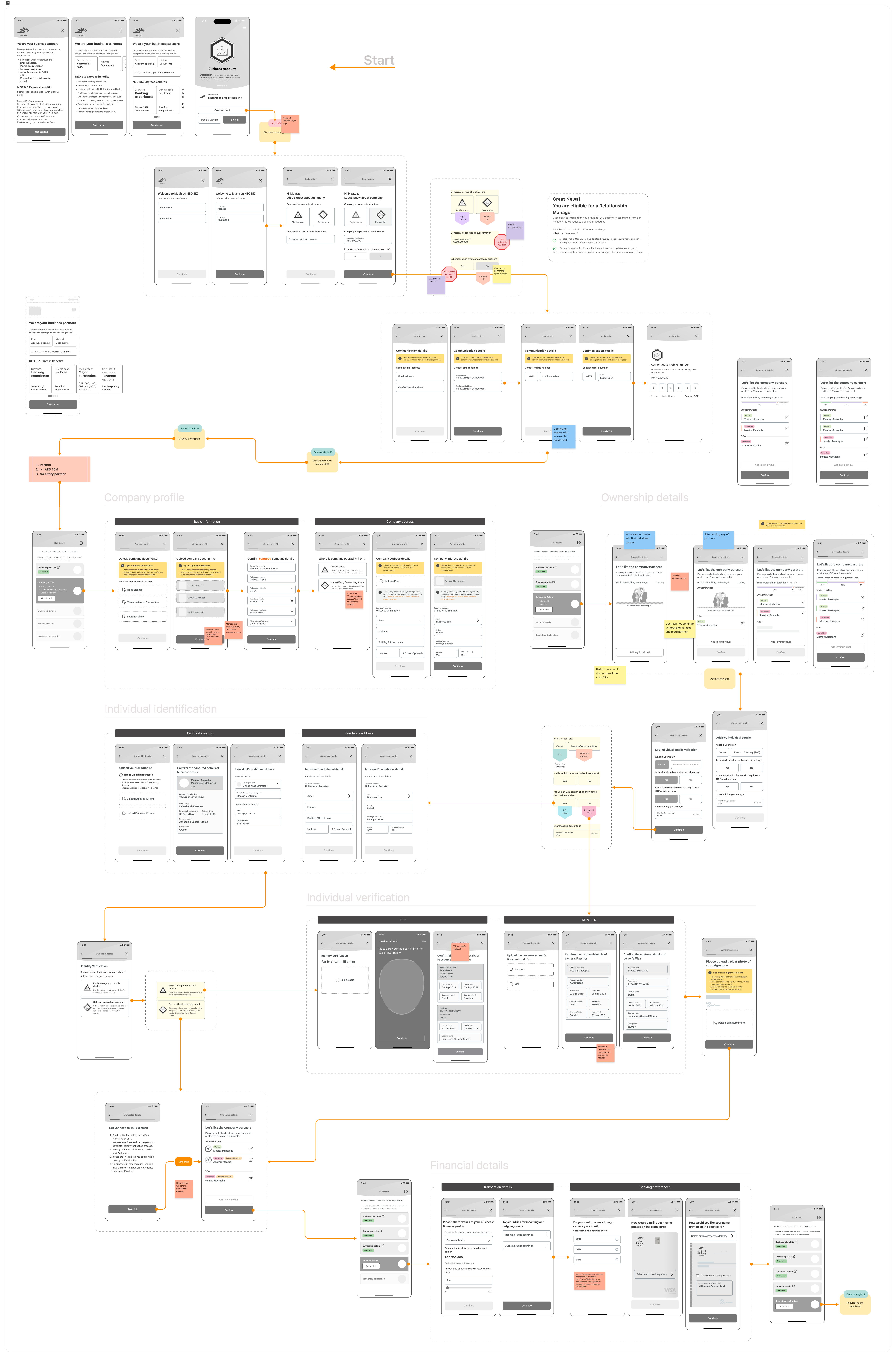
Early sketches and low-fidelity wireframes were created to visualise the initial design ideas. These wireframes were used to discuss and refine the concepts before moving to high-fidelity prototypes.

Design in Action

User-Friendly Interface

Design Principles

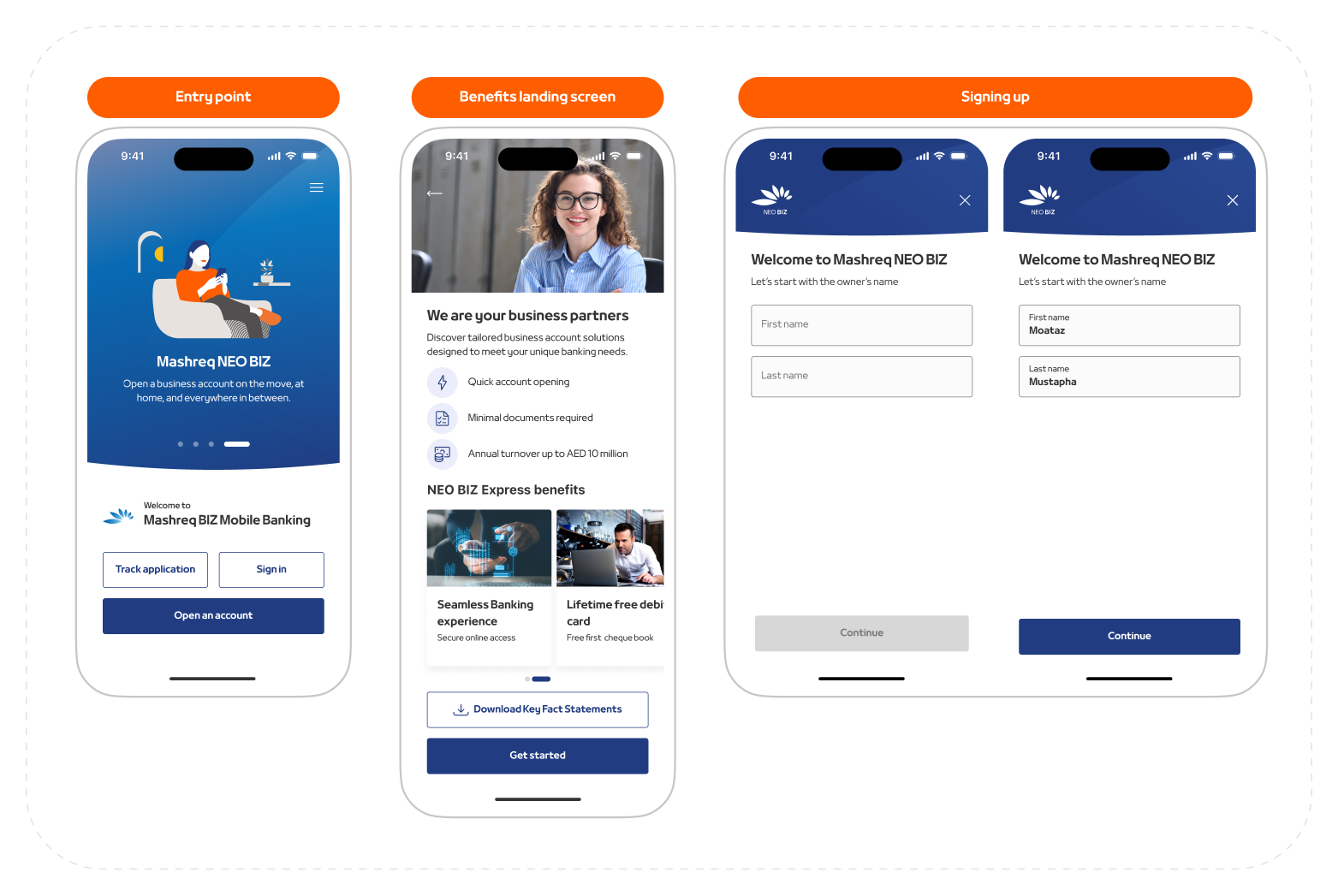
We adhered to principles of simplicity, clarity, and user-centricity. The interface was designed to be intuitive, with a clean layout and easy navigation to ensure a smooth user experience.

Secure Authentication

Security Measures

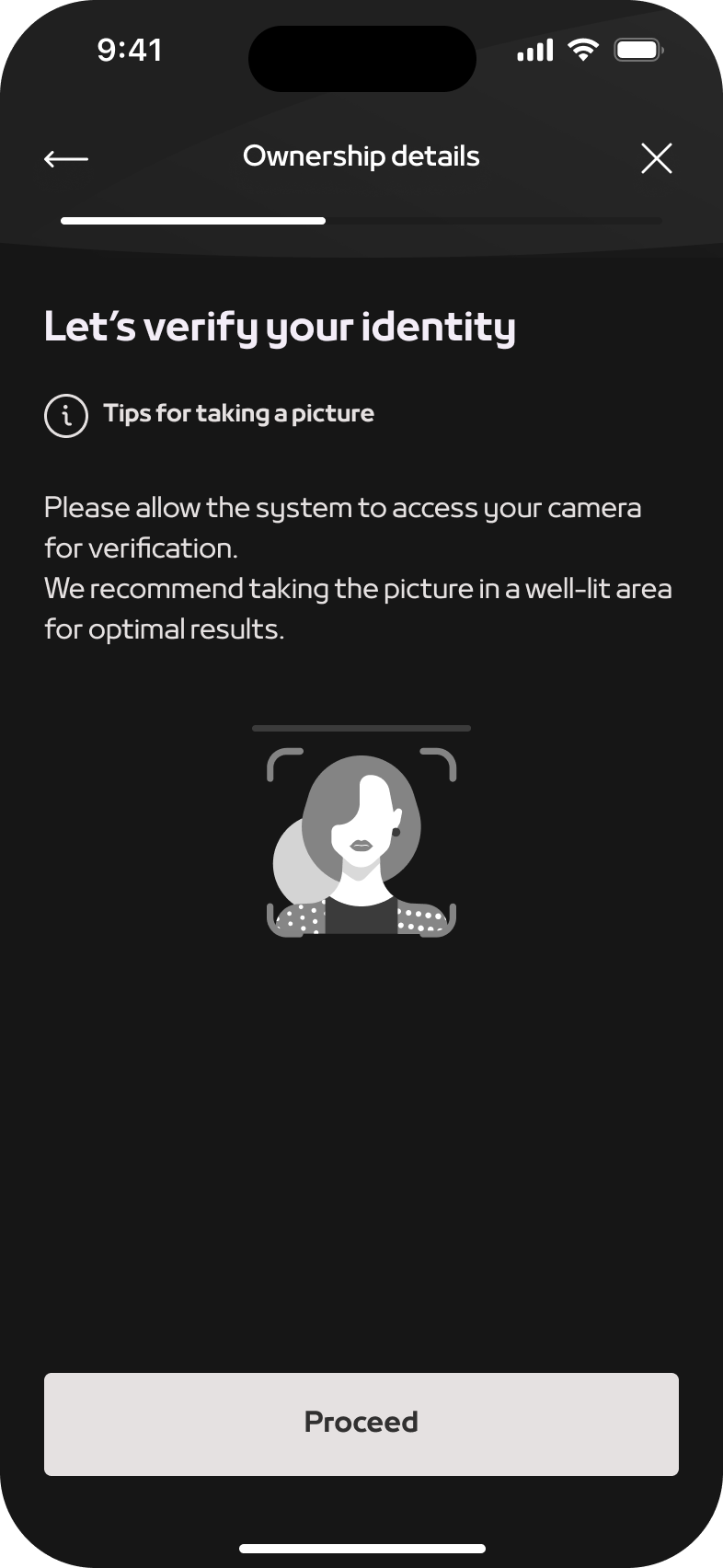
Robust security measures, including multi-factor authentication and data encryption, were implemented to protect user data and maintain trust.

Step-by-Step Guidance

Onboarding Flow

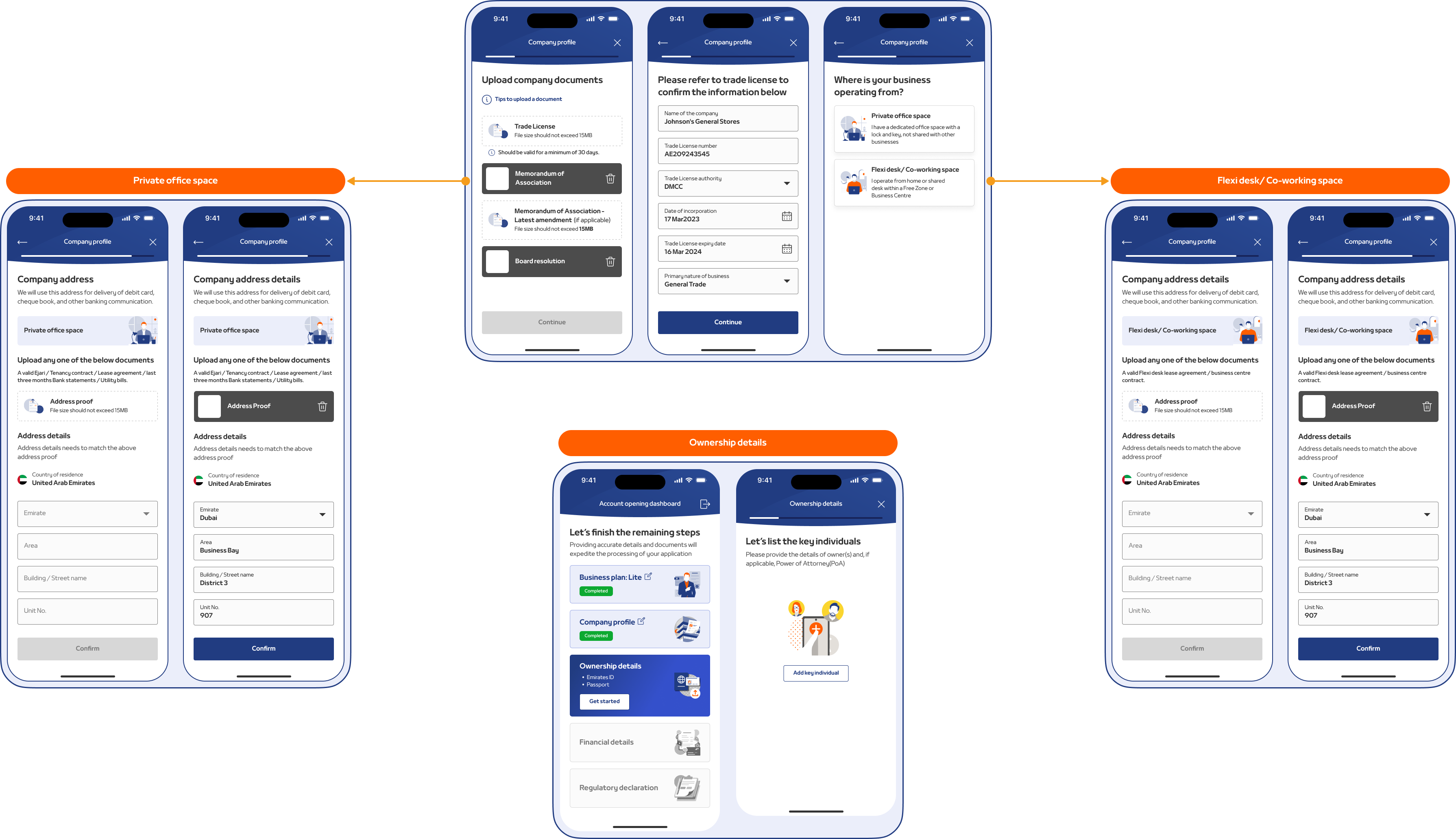
The onboarding process was broken down into clear, manageable steps. Each step included concise instructions and visual cues to guide users through the process effortlessly.

Visuals

Document Upload

Functionality

Users can easily upload required documents directly through the app using their device’s camera or file upload options. The process was made seamless to reduce friction.

Instant Notifications

Notification System

Real-time notifications keep users informed about their application status, providing updates at each stage of the onboarding process. This feature ensures transparency and reduces user anxiety.

Testing

Usability Testing

Methods

Usability testing involved real users interacting with the prototype. We used methods such as think-aloud protocols, task completion rates, and post-test interviews to gather feedback on the design’s usability.

Key Findings

Feedback from usability testing highlighted areas for improvement, such as simplifying certain form fields and enhancing visual cues for better navigation. Users appreciated the clear instructions and secure authentication measures.

Iterations and Refinements

Iterative Design Process

Based on user feedback and testing results, we made iterative refinements to the design. This included tweaking the interface, improving the onboarding flow, and addressing any usability issues identified during testing.

Impact

Business impact

Increased Acquisition

The implementation had a great positive effect on the business: it facilitated an easy, smooth onboarding process which noticeably improved the customer acquisition rates. Also, with the new mobile app, the bank could gain more business banking customers, especially in the UAE where the usage of mobile devices is widespread.
The user-friendly interface and steps taken by the user to minimize errors for the users helped reduce the inquiries with customer support, while saving money and bringing operational efficiencies.
Easy uploading of documents and instant notifications reduce the hassle of customers and improve customer satisfaction, which results in higher customer retention rates.

Customer Impact

Customer Satisfaction

A seamless and intuitive experience. The user-friendly interface and clear instructions made it easy for business banking customers to complete the onboarding process quickly and efficiently.
The secure authentication measures ensured the safety of their personal and business information, enhancing their trust in the bank. The ability to upload documents directly through the app and receive real-time updates on their application status added convenience and transparency to the process.

Overall, the improved onboarding experience led to higher satisfaction levels among customers, fostering loyalty and encouraging them to recommend the bank’s services to others.

Conclusion

Summary

Successfully achieved its primary objectives. The streamlined and efficient process enhanced the user experience, resulting in higher customer satisfaction and retention rates. The increase in customer acquisition rates and the operational efficiencies gained through the reduced need for customer support demonstrated the business impact of the new process. By focusing on the needs and expectations of business banking customers, the bank was able to create a user-friendly and secure onboarding experience that set it apart from competitors and positioned it for continued growth and success in the market.

Design. Iterate. Deliver.
Let's collaborate!
Connect on LinkedIn
Moataz Mustapha